Record the walkthrough instead of writing three paragraphs.
Bug repros, feature demos, async updates. A short clip with click highlights and zoom says it better.
Instead of three paragraphs of steps to reproduce
Screenshots with markup, screen recording with editing, audio, and web pages, in one Mac app with a library that keeps it all searchable. Make it once, and the next time someone asks, send a link instead of a paragraph.
Free · macOS 15 (Sequoia)+ · Apple Silicon · no account needed
Most people explain things with a patchwork: one app to grab the screen, another to mark it up, a recorder, an editor, a read-it-later list and a folder nobody can search. SuperCapture is all of them, with the same shortcuts and one place to find things later.
What you use now
⌃⇧C from any app ⌃⇧R repeats the last one
Annotating and redacting⌃⇧V starts and stops ⌃⇧P pauses
Recording with audio


 Safari, Chrome, Brave and Firefox. Edge is coming soon.
S jumps to search
See it find somethingAlso in the box: slide decks paged into a PDF, QR codes and barcodes in your own colors, and the images on any web page saved straight to your library. Making a QR code
Five tools are only worth it if they save you something. Every team has something it keeps putting into words: steps to reproduce, which button, where the setting is. Each of these used to be a paragraph, a meeting or a screen share. Now it’s one capture you send.
Bug repros, feature demos, async updates. A short clip with click highlights and zoom says it better.
Instead of three paragraphs of steps to reproduce
Pixel-perfect grabs, feedback arrows and polished frames. Drag and drop, no export dance.
Instead of “No, the other button. A few pixels lower.”
Numbered steps and an arrow to the right button. Keep it in a folder your team sharesPro, and the next time the question comes in, the answer is already there.
Instead of “Go to Settings, then Share Menu, then scroll to Slack…”
Looping GIFs, social clips and on-brand visuals, recorded, trimmed and exported from one app.
Instead of exporting frames, a GIF maker, resizing, exporting again
Share any capture as a web page. Whoever gets the link opens it in a browser, with no account and no app, and can answer right on the picture.
The old way
One link
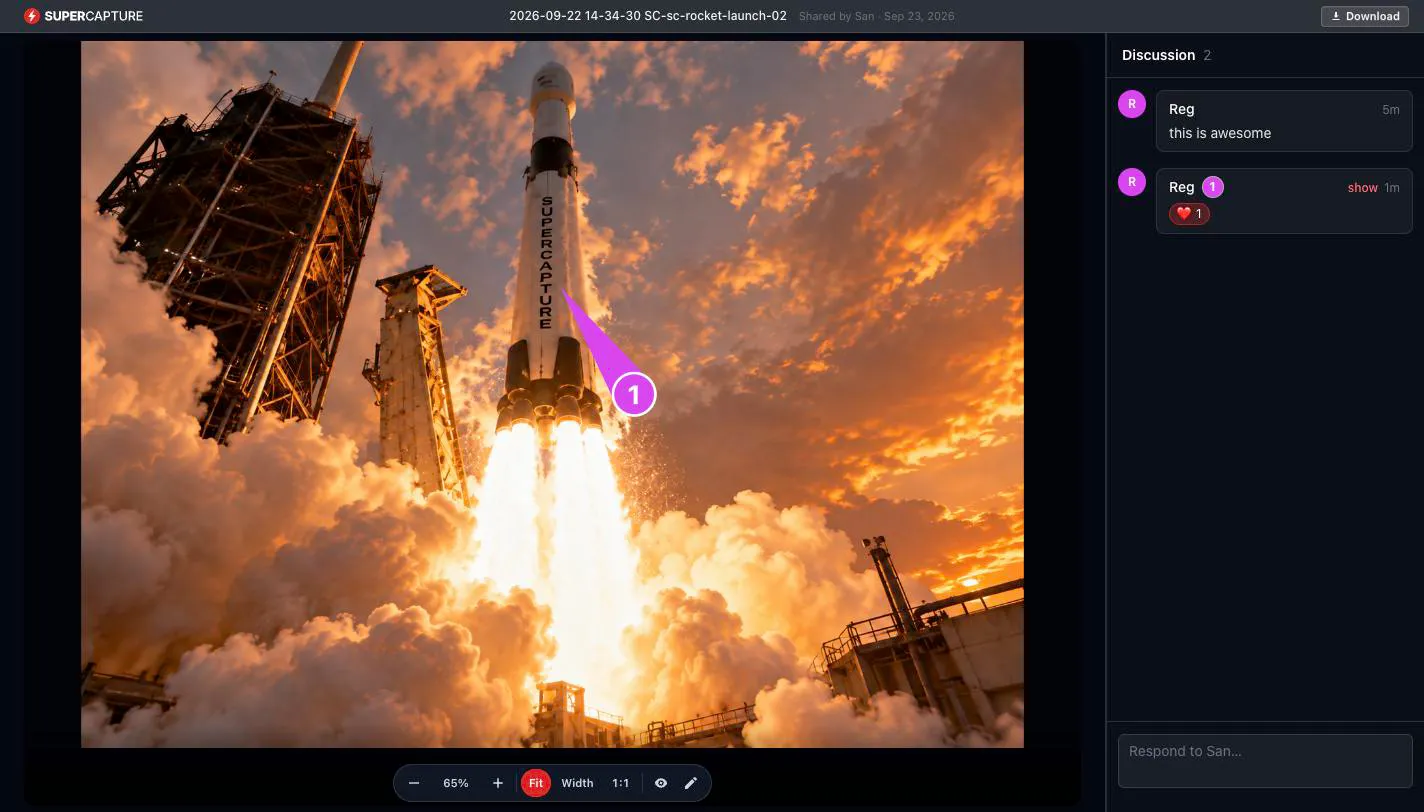
Comments pinned to a spot in a picture or a moment in a recording, with replies that show up live. A recording’s feedback also appears in your Mac video editor.
Add a password or an expiry date. Share pages stay out of search engines, and you can take one down whenever you like.
Up to 200 images or PDFs behind a single link.
Drag a capture from the gallery straight into Slack, email, Figma or a doc, or press ⌘C and paste the finished, marked-up result.
Exports to the formats you actually use: PNGJPGWebPSVGPDFMP4MOVGIFAPNG. Free share pages carry light SuperCapture branding.
You don’t remember where you saved it, or when. You remember a couple of words that were on the screen. That’s enough.
The old way
Type two words
Every capture is read on your Mac, so any text that was on the screen is searchable.
On-device tags sort captures into receipts, documents, apps, social posts and more.
Type #darkblue or #F87171 to find pictures by color.
Type pdf:, video: or audio: to list one kind.
All of it is indexed on your Mac, and it stays quick with tens of thousands of captures.How screenshot search works
Put it in a folder the team shares, and the next person to get the question finds your answer in their own library, not in your head.
The old way
It's in everyone's library
It’s opt-in. Leave the cloud off and everything stays on your Mac.
Share a folder with other SuperCapture accounts and it shows up in their library too, automatically.
As editors or viewers. You stay the owner, and you can stop sharing any time.
Mark a folder or collection to sync and it follows you across your Macs, with iPhone and Android apps coming soon. Free syncs up to 500 items; Individual and Pro sync your whole library.
Pro for teams puts every seat on one invoice, with single sign-on, an admin console and audit log, and the option to keep originals in your own S3-compatible bucket. Get in touch and we’ll set it up.
SuperCapture runs an MCP server on your Mac. Claude Code, or any MCP client, can capture, record, mark up, search the library and share, through 24 tools that work the way the app does.
Its edits are undoable, and anything permanent or public, like deleting for good or publishing a page, waits for your OK.
The old way
Ask for it once
Setup is one command, copied from Settings.
How the MCP server worksYou: Grab the Slack settings, number the three steps to connect it, and post it to #support.
Screens are full of things nobody else should see. So the default is simple: nothing leaves your Mac until you decide it should.
Read the security overview, and how we handle data in our Privacy Policy.
The receipt with the serial number, found years later by typing the serial number. The recipe page, kept whole after the tab is gone. Trips in one album the family adds to. Before-and-after shots for the renovation, step-by-steps for the class you teach, and the error message for the family IT desk, all in one searchable place.
One app instead of five: screenshots and markup, recording and editing, audio, web pages and a Reader, and a library that finds any of it again when the question comes back.
Free · macOS 15 (Sequoia) or later · Apple Silicon (M1 or later) · no account needed
Free includes every capture tool, the editor and local search, with light branding on exports. Individual removes the branding and syncs your whole library; Pro adds comments, shared folders and end-to-end encryption.